Blender 5.0 will come with new socket types for bundles and closures. This post will explain what they are, why they are important, and what we want to do with them going forward.
Overarching Goal
These two new concepts help us get closer to one of our primary objectives: allow building flexible and high level functionality using Geometry Nodes, that is, tools that can be used without the need to understand how everything works inside.
Bundles and closures are powerful tools for node group authors, enabling them to build simpler, more flexible tools. They also make it possible to build declarative systems using Geometry Nodes, opening up a whole new node group design paradigm.
Bundles
Bundles are the simpler concept of the two. A bundle combines multiple items into one, allowing passing many items with a single link. They are also akin to “structs” in programming.
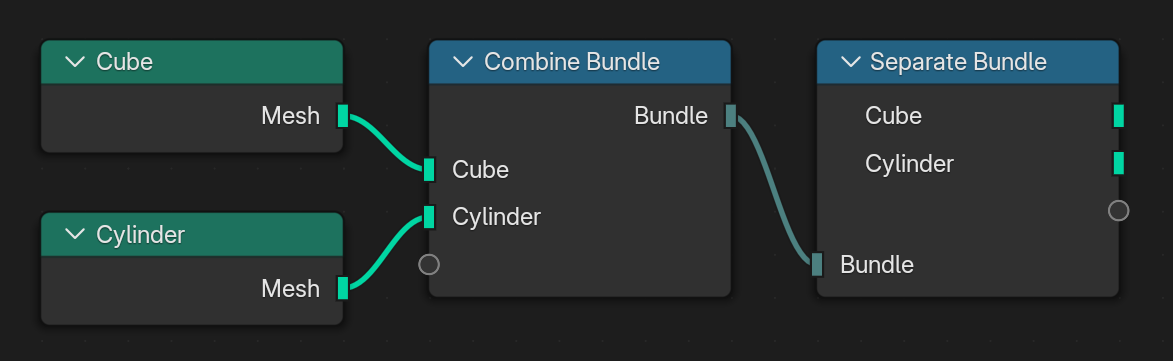
The two new nodes for dealing with bundles are the Combine Bundle and Separate Bundle nodes. They create a new bundle from an arbitrary number of items and split it up into separate items again respectively.
All Geometry Nodes types are allowed in bundles. That includes geometries, single values, fields, objects, and more. They can also be baked in the Bake node or simulation zone.
Closures
Imagine you have a node group generating a terrain by first generating a base mesh, then scattering some tree positions and then instancing the trees on those positions.
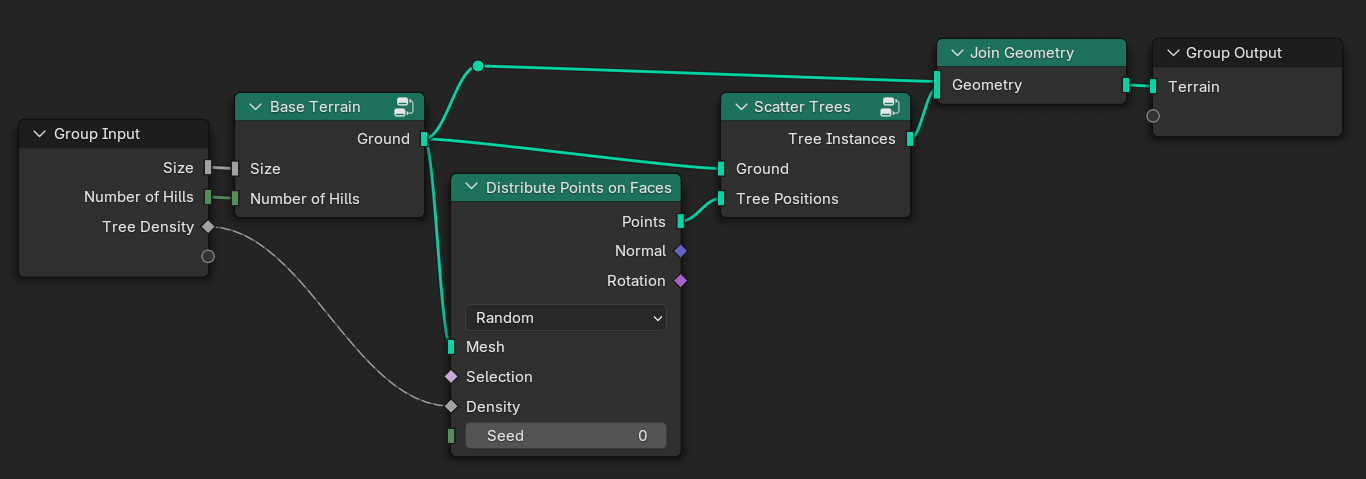
While this node group allows customizing the tree density, it gives the user very limited control over how trees are distributed. Giving the user more control is difficult because the point distribution happens somewhere in the middle of the node group. So it can’t just be done before or after the terrain generation.
Closures solve this by allowing custom functionality to be passed into node groups. This is done by adding the new Evaluate Closure node in place of the distribute node. Then the closure has to be exposed as group input.
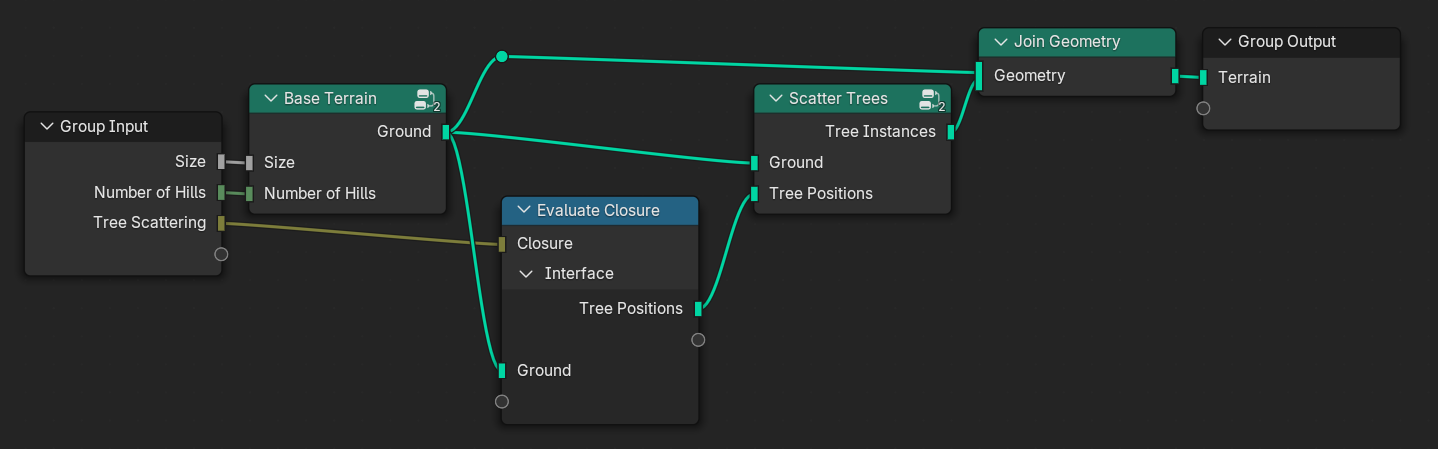
When using the node group, one can now specify a custom distribution function using the new Closure Zone. What’s inside the zone is basically injected into the node group when it is evaluated. Note that the names of inputs and outputs of the closure zone have to match the names used in the Evaluate Closure node. More on that in the next section.
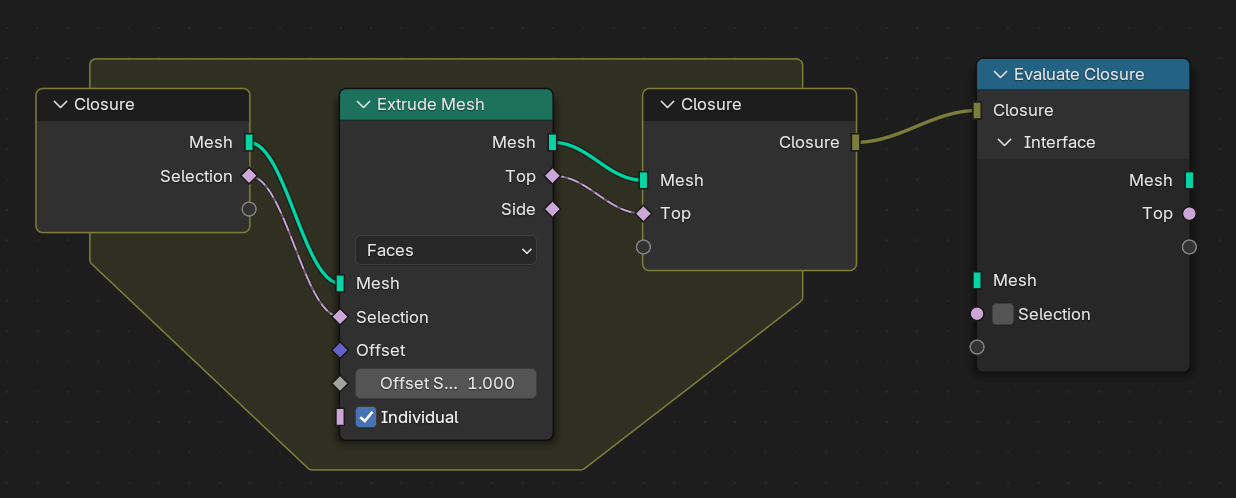
Additional accompanying node groups can be built for the terrain generator for different tree scattering patterns. Those can be provided by the same author or by third parties which just implement the same interface.
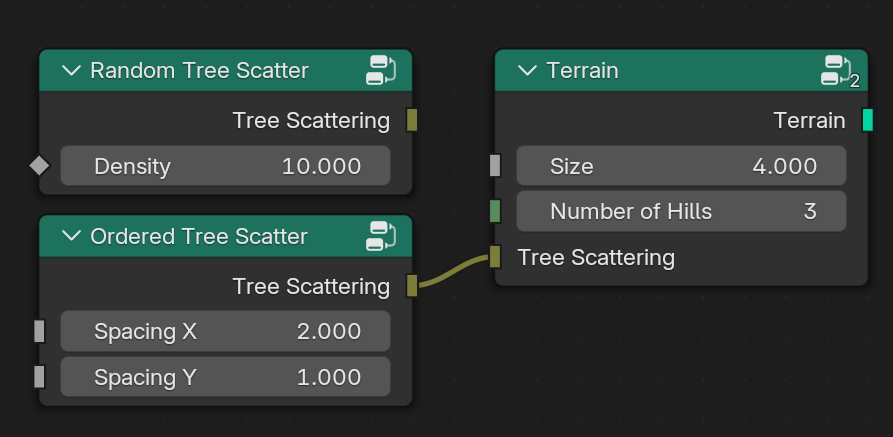
In practice, high level terrain generators should most likely come with some basic scattering features built-in, while allowing for more advanced customization using closures.
Pass Through
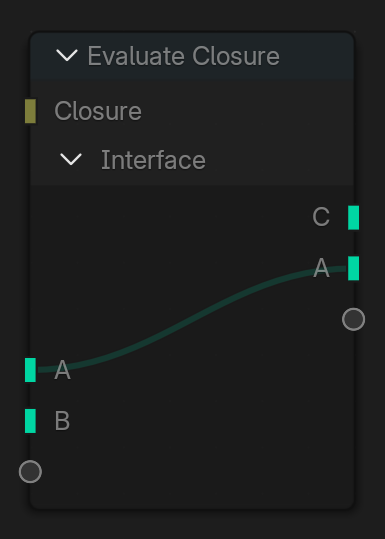
When an Evaluate Closure node is muted or no closure is connected to it, it automatically passes through values for inputs and outputs with the same name. This is very useful when the closure just is optional for the user.
Capturing Values
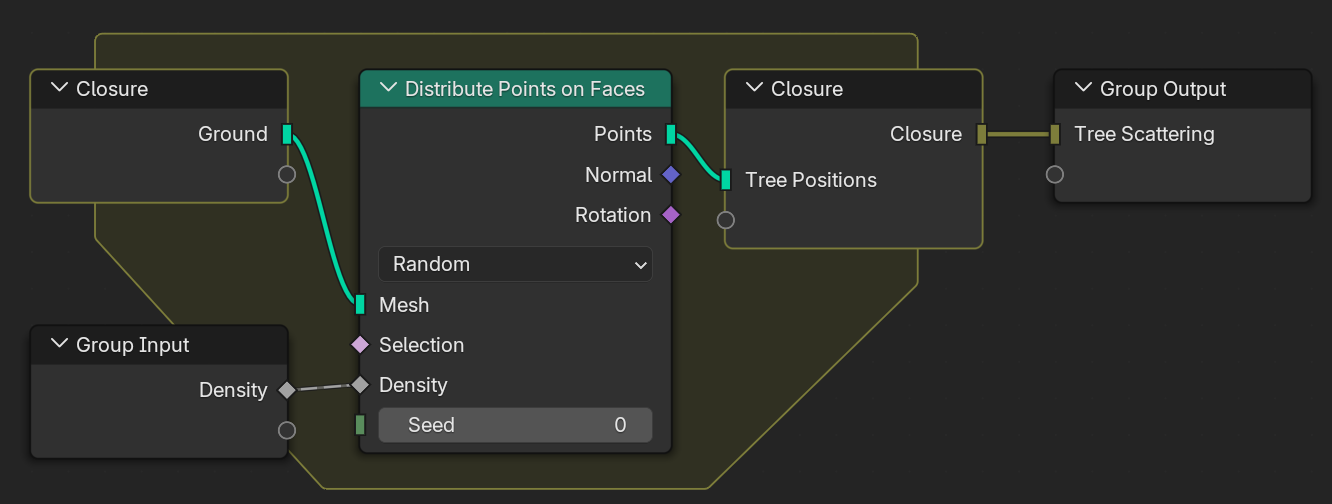
One key feature of closure zones is that they can capture values that are passed into the zone from the outside. For example, the random tree scattering node group from before could look like in the image below. Note how the passed in density is captured and thus becomes part of the closure.
Socket Inspection
While closures offer many possibilities for building high level tools, that comes at the cost of more difficult debugging. That’s because you can’t simply evaluate the node tree from left to right; you may need to jump back and forth if closures are evaluated.
The main tooling we have so far is that viewer nodes and socket inspection are supported in closure zones. That works best when the closure is evaluated in a single place because then Blender knows exactly which context to inspect in the closure. If the closure is evaluated in multiple places, Blender currently picks one basically at random. More control over this may be added later.
Syncing Sockets
As hinted at before, both closures and bundles use names to identify their inputs and outputs. If the names don’t match, there is an error. Generally, it is not possible to automatically rename the sockets because the corresponding nodes may be in entirely separate node groups.
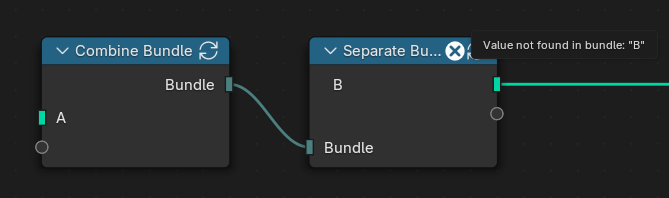
However, in practice Blender can usually infer what the correct sockets should be by following links. If it is detected that two bundle or closure nodes are connected but have different signatures, a new icon to sync a node shows up. When clicking on it, the node will automatically be updated to match what is connected.
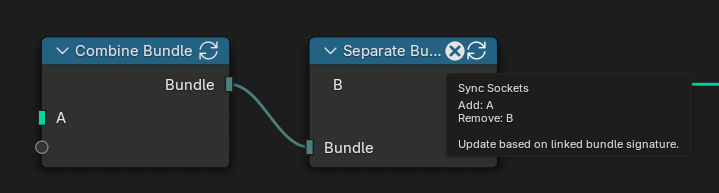
The syncing happens automatically when linking such a node for the first time. If the node already has some sockets, those are never updated automatically as it is assumed that they are intentional and updating them might lose information.
Future
Having bundles and closures in Geometry Nodes already helps a lot, but it also benefits a lot of future development. Here are some of the things that are in the pipeline already:
Input Widgets
Currently, a major limitation of exposing control to node groups is that they can’t have curve mappings or color ramps as inputs. So, before closures, one always had to make a copy of the node group just to customize e.g. a color ramp.
Closures already lift this limitation because one can put the color ramp node into a closure to pass it into the node group. However, that is not very convenient, and it would be better if a widget could be available on the group node directly.
Luckily, these widgets can be treated as a closure directly. For example, a color ramp is a closure mapping a float to a color, and a curve mapping is a closure mapping a float to a new float. Therefore, these widgets can be used as “subtypes” of closure sockets. There is a work-in-progress patch already.
Physics
Physics and other declarative systems benefit greatly from bundles, and for extra flexibility, also closures.
For physics simulations, one generally has to pass all the simulated entities and their constraints to a physics solver which then does the actual simulation. Until now, we didn’t have a proper way to package all that information in a way that we can pass around in Geometry Nodes. Now, bundles solve this because one can just put all information about the physics world into a (nested) bundle which is then acted on by the solver.
There is are ongoing experiments exploring how that can work in more detail.
Beyond Geometry Nodes
Many features like repeat zones, bundles, closures or input widgets make sense outside of Geometry Nodes. There is ongoing work to make these features available in shading nodes by preprocessing the node tree internally and inlining all these more advanced features. This makes them work with all render engines with minor modifications.
This can also solve cases like having to copy a node group just to change the texture it uses. Additionally, it can also allow creating a bundle with related textures, like a PBR texture set.
The compositor should also support these features eventually, but we’ll likely add support there differently. Similar to Geometry Nodes, its evaluator should support these features out of the box without having to inline everything. The reason being that inlining does come with some limitations like the number of iterations in a repeat zone having to be constant under some circumstances.
Conclusion
Bundles and closures get a good step further on our journey to support building high level tools with Geometry Nodes that all users, regardless of proficiency level, can benefit from. It also opens up many opportunities for features that were very hard to implement before. I’m looking forward to seeing all the ways people will use this.
Support Blender
Development requires dedicated design and development resources.
Donate monthly or one-time to help make this happen.